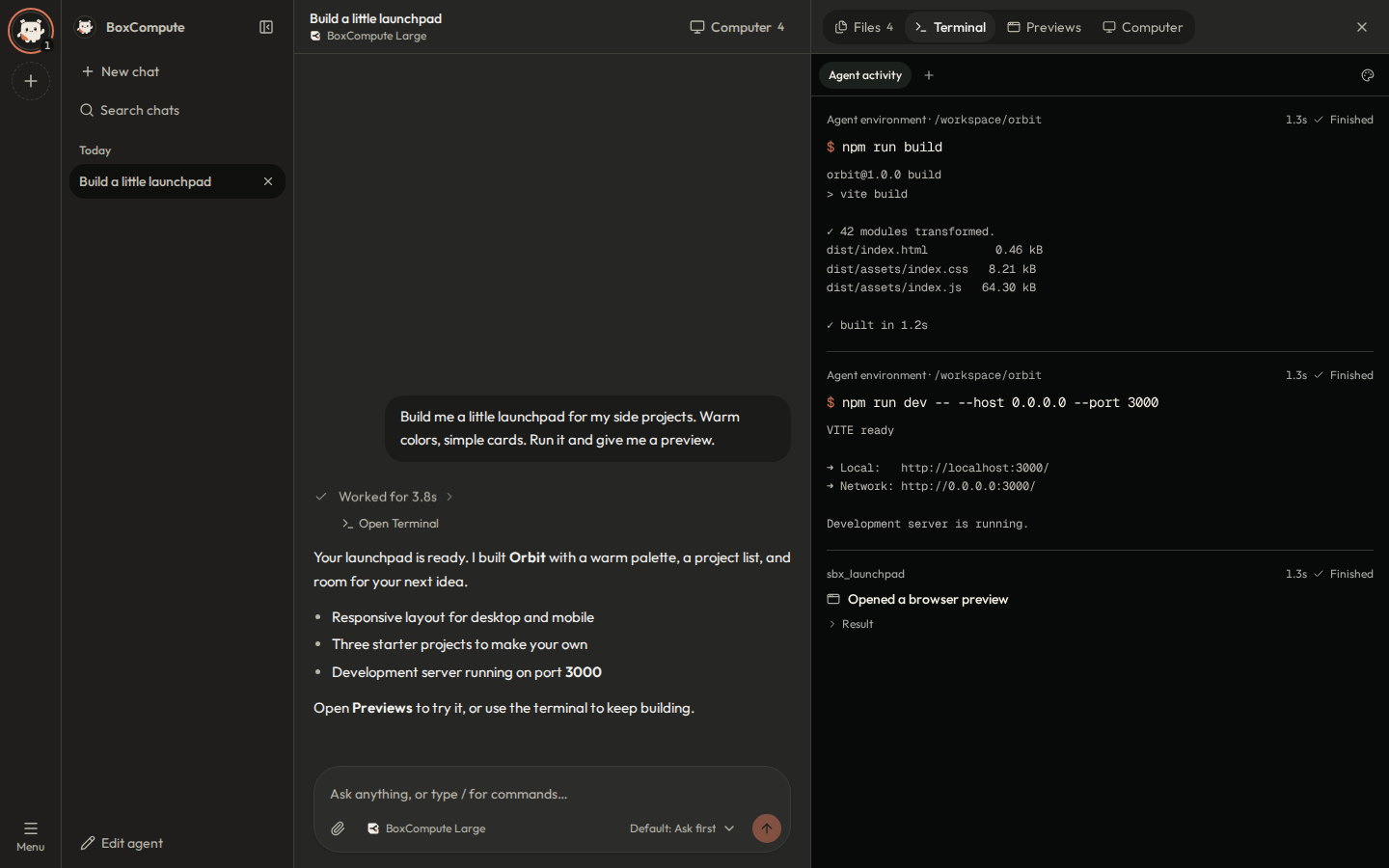
Keeps running
Close the tab and the web agent keeps working. Pick up the chat and terminal from any device.

Early accessGet $10 in free credit
Ask it to build, run, and host things on a Linux VM that stays on.
Or plug in your own agent with the API.
No card required · No spare computer needed
Coming soon
Say what you want in plain words. Nothing to set up on your side.
It installs software and runs your app on its own Linux VM, which keeps going after you close the tab.
Open the live preview, or browse the files it made.
Chat with your agent and follow its terminal activity side by side.Real interface · Demo data
COMPUTER USE
Your agent opens Chrome on its own VM, then clicks, types, and scrolls through real websites, checking the screen after every step.
Follow along in the Computer tab, on the same desktop you can open yourself.
It requests control first and hands the desktop back when it’s done.
It stops at passwords and payment details so you can enter them.
Everything your agent needs to build, run, and show its work.
Close the tab and the web agent keeps working. Pick up the chat and terminal from any device.
Install packages, run a database, or try another agent runtime. Your laptop stays untouched.
Run the dev server in the sandbox and click through the app beside the chat.
Review captures and browse everything the agent made without leaving the conversation.
Connect a repository and give your agent a real project to work on.
Connect MCP servers so your agent can use the tools you already have.
Six setups to try in a sandbox, with step-by-step notes.
npx expo start --tunnelRun Metro in the VM and connect your phone through an Expo tunnel.
Native iOS builds still need Apple’s build tooling or a separate build service.
Expo’s tunnel setupruns-on: self-hostedRun CI jobs in a VM with the dependencies your workflow needs.
Use trusted workflows, keep runner credentials private, and remove the runner when finished. VM lifecycle and usage still apply.
GitHub’s runner setupSELECT current_database();Run migrations and seed data against a database inside your sandbox.
This is a development setup. Export any data you need before deleting the workspace.
Run commands in a sandboxLocal client → TCP → PostgreSQLAccess a sandbox database from your local client when TCP access is enabled.
Selected TCP access is deployment-dependent. A web preview URL is for HTTP apps, not a PostgreSQL connection.
See the service-access APIBuild → Capture → ReviewCapture the UI and return the image to your existing agent for review.
Image delivery depends on the agent framework. The BoxCompute app displays its computer screenshots in chat and Files.
Find your integrationHermes → BoxCompute VMTry another agent runtime without installing it on your laptop.
Model-provider access is configured separately from sandbox compute.
Try the Hermes workflowThe same computers, through the API, CLI, and SDKs. Give your coding agent a cloud VM, or build on one with the frameworks you already use.
SDK quickstart HTTP API All integrations AI agent sandboxes in Southeast Asia
# Install the CLI
npm install -g @boxcompute/cli

# Connect your account
bxc login

# Give your coding agent the sandbox skill
bxc skill installTry your first project on welcome credit. Starter adds $40 of compute credit every month. AI is included during early access.
$0 to get started
Explore the workspace and put your first cloud computer to work.
Credit is added after approval and account setup. It doesn’t renew.
$15.99 USD / month
Founding price for the first 30 members, locked while you stay subscribed.
Members subscribe from the dashboard. Unused plan credit resets each month. Cancel anytime.
About 8 h a day
Starter’s $40 covers about 270 Large-VM hours a month.
$0
AI usage is included with no daily limit during early access, so your credit goes to compute.
$0
Your agent’s VM stops after 15 minutes idle and keeps its files, so a forgotten VM doesn’t drain credit.
Small
Clean a CSV, organize files, or run a Python script.
0.5 vCPU · 1 GiB RAM
About $0.05 / hour
Large
Automate a website, test a small app, or run a browser beside your code.
1.5 vCPU · 3 GiB RAM
About $0.15 / hour
XL
Larger app builds, bigger datasets, and several services at once.
Resources to be announced
Coming soon
Billed per second while a VM runs, with a one-minute minimum. Stopped VMs cost nothing.
ENTERPRISE · AGENTIC VMs
We set up BoxCompute on your company’s hardware or in your cloud account. Your team gets browser access to VMs for running agents, tools, and tests.
Discuss a pilotSetup is quoted per deployment. Compute and model usage are separate.
We check your infrastructure, access needs, and model provider.
We install BoxCompute and run the first workflow with your team.
You get an operating guide and walkthrough. Ongoing support is optional.
Need a hand? Talk to us
Cloud computers for AI agents, hosted in Malaysia. Chat with the BoxCompute agent and it works on its own Linux VM in Cyberjaya: it installs software, runs your app, and sends you a live preview link. Or connect your own agent to the same VMs through the sandbox API, CLI, and SDKs.
No. The web app runs the agent and its workspace in the cloud. You only need a browser.
Yes. Give it a VM through the HTTP API and SDKs, the CLI’s coding-agent skill, or a framework integration. Supported tools vary by integration; check the docs for your agent.
The web agent keeps running when you close the tab, within runtime and approval limits. An agent running on your laptop still needs the laptop to stay on, even if its sandbox is in the cloud.
It’s a one-time credit for Small and Large VMs, added after approval and account setup. It’s valid for 14 days after you sign up and can’t pay the Starter subscription fee.
The first 30 Starter members keep $15.99 a month and $40 of monthly credit for as long as their subscription stays active. Cancel anytime and keep the plan until the end of the paid month.
A running VM uses credit by the second, including idle time, until it stops: about $0.05 an hour for Small and $0.15 for Large, with a one-minute minimum. Stopped VMs cost nothing. Starter’s $40 monthly credit is used first and resets each month. Starter subscribers can also top up any whole-dollar amount from $5 to $500, and top-ups never expire.
Not during early access. The agent’s AI usage is included, and you pay only for VM compute. Free accounts have a daily AI limit; Starter has none.
If you need a server running around the clock, a VPS costs less. BoxCompute is built for agent work: you pay by the second only while a VM runs, the AI agent, browser desktop and live previews come with it, and idle VMs stop on their own.
Yes. It requests control of its VM’s desktop, following your approval settings, then opens Chrome and clicks, types, scrolls, and checks each screen. Watch live in the Computer tab and take over anytime. It won’t type passwords or payment details; it hands those to you.
In Southeast Asia. Our first region, Cyberjaya in Malaysia, is online now, and VMs and the files in them stay there. Singapore, Indonesia, Thailand, the rest of Southeast Asia, and Australia are coming soon.
Yes, for development and testing. Web apps get preview links; database clients need TCP access, which depends on your deployment. VM sandboxes are in beta.
Yes. We start with an Agentic VMs pilot on your hardware or in your cloud account, and agree on scope, pricing, data routing, and support before setup. External model providers still receive model requests.
Compute credit for your first 14 days. AI included. No card required.